
Hello Operator1.0.2 - Get APK
You'll be able to download in few seconds.
Publisher Description
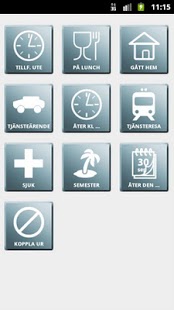
Hello Operator is an app designed to manage network/switchboard services provided by the operator, specifically regarding absence/DND (Do Not Disturb). The current version has built-in templates for the following operators (although everything is fully customizable):
• Spring Mobil
• Tele2 Mobila Växeln
• Telenor One
• Telia Centrex
• Telia Jobbmobil
• Others (customizable)
Is your service missing? Let me know and I'll include a template right away! Users have successfully configured and used the app with e.g. Aastra MX-One, BP, Trio Agent and Intelligate.
NOTE! There will be a future release with more features aimed towards business users. For instance the ability to pre-configure and share your company's settings to your users.
The application provides a clean and simple interface to easily manage your DND-status. When applicable, you'll be prompted for end time and/or date, after which the application places a phone call (or text-message) that sets your status. It can also show a notification icon (optional) to remind you of your current status.
Call groups and other IVR/PBX functions can also be managed from within the application.
Please do not hesitate to contact me regarding requests, feedback or bug-reports. I can not reply to comments on the Market, so please use the e-mail below or within the app.
Want the app in your language? Contact me!
About Hello Operator
The company that develops Hello Operator is devlib.se. The latest version released by its developer is 1.0.2.
To install Hello Operator on your Android device, just click the green Continue To App button above to start the installation process. The app is listed on our website since 2013-03-21 and was downloaded 0 times. We have already checked if the download link is safe, however for your own protection we recommend that you scan the downloaded app with your antivirus. Your antivirus may detect the Hello Operator as malware as malware if the download link to se.devlib.apps.hellooperator is broken.
How to install Hello Operator on your Android device:
- Click on the Continue To App button on our website. This will redirect you to Google Play.
- Once the Hello Operator is shown in the Google Play listing of your Android device, you can start its download and installation. Tap on the Install button located below the search bar and to the right of the app icon.
- A pop-up window with the permissions required by Hello Operator will be shown. Click on Accept to continue the process.
- Hello Operator will be downloaded onto your device, displaying a progress. Once the download completes, the installation will start and you'll get a notification after the installation is finished.
Program Details
System requirements
Download information
Pricing
Version History
version 1.0.2
posted on 2013-03-21
v1.0.2 (15-May-2011),+ Now supports AM/PM as well as 24 hour clock,* Minor GUI improvements,+ Added possibility to change service template,v1.0.1 (13-May-2011),* Fix for manually adding icons
version 1.0.2
posted on 2011-05-12
Several fixes and updates
Disclaimer
External Download
We do not host Hello Operator on our servers. We did not scan it for viruses, adware, spyware or other type of malware. This app is hosted by Galad and passed their terms and conditions to be listed there. We recommend caution when installing it.
The APK Download link for Hello Operator is provided to you by apps112.com without any warranties, representations or guarantees of any kind, so access it at your own risk.
If you have questions regarding this particular app contact the publisher directly. For questions about the functionalities of apps112.com contact us.
